How it works
Add your images, pick the format you need, and press Convert. Your browser opens each image, redraws it, and saves it again in the new format. The table shows every file before and after: its format, its size on disk, its pixel size, and how much smaller or larger it came out. Download the files one at a time, or all together as a ZIP.
There are two ways to control how hard the tool squeezes:
- Set the quality. A slider from 40 to 100. Higher means a larger, cleaner file. The default is 90, the same setting Tidy's Square Images tool uses, and a good place to stay for product photos.
- Aim for a file size. Tell the tool "under 200 KB", "under 500 KB", "under 1 MB" or your own figure. For each image it saves at quality 95 first. If that fits, it stops. If not, it checks quality 40, the lowest it will go, and then tries settings in between, halving the gap each time, until it finds the highest quality that fits. That takes about eight saves per image.
If an image can't get under your target even at quality 40, the tool does not quietly hand you a wrecked file. It marks that row, tells you how small it could get, and makes nothing. The fix is nearly always fewer pixels: choose a smaller "longest side" and convert again.
A KB is counted here as 1,000 bytes and 1 MB as 1,000,000 bytes. Some sites count 1,024 instead, which makes their limit a little more generous. Using the stricter count means the file is under the limit whichever way a site measures.
A worked example with the samples
"Try the samples" loads two AI-generated product photos from Square Images: a blue bottle, 1,024 × 1,536 pixels, and a mug, 1,536 × 1,024 pixels. Both are PNG files, 1.72 MB and 1.84 MB. We converted them with this tool and wrote down what came out.
| Setting | Bottle (1.72 MB PNG) | Mug (1.84 MB PNG) |
|---|---|---|
| JPEG, quality 90 | 117 KB | 162 KB |
| JPEG, quality 80 | 64 KB | 94 KB |
| WebP, quality 90 | 64 KB | 113 KB |
| PNG | 2.35 MB (37% larger) | 2.52 MB (37% larger) |
| JPEG, under 1 MB | 213 KB at quality 95 | 274 KB at quality 95 |
| JPEG, under 200 KB | 180 KB at quality 94 | 185 KB at quality 92 |
| JPEG, under 100 KB | 91 KB at quality 87 | 94 KB at quality 80 |
| JPEG, under 50 KB | 49 KB at quality 72 | 49 KB at quality 54 |
| JPEG, under 50 KB, longest side 1,024 px | 45 KB at quality 89 | 46 KB at quality 82 |
| JPEG, under 5 KB | No file: 29 KB at quality 40 | No file: 38 KB at quality 40 |
Measured with this tool in Chrome on 11 November 2026. Sizes are as the tool's table shows them. Another browser will give different sizes.
Four things are worth noticing.
- Converting these PNG photos to JPEG at quality 90 cut them by 93% and 91%. Nothing else on this page saves as much for as little visible change.
- Saving them as PNG again made them 37% larger. The browser's PNG writer is less thorough than the program that made the samples, and PNG has no quality to turn down. The tool shows this in red, so you can see it before you download.
- The target mode stops as high as it can. Asked for "under 1 MB", it used quality 95 and stopped, because both files already fitted. Asked for "under 200 KB", it settled on quality 94 for the bottle and 92 for the mug, leaving both just under the line.
- Fewer pixels beat lower quality. To get the mug under 50 KB at full size, the tool had to drop to quality 54. With the longest side set to 1,024 pixels, the same target fitted at quality 82. And when we asked for the impossible, under 5 KB, the tool made no file and said how small each image could go.
Which format, and what to expect
We have measured this separately, outside the tool. For the guide JPEG, PNG or WebP for product photos? we saved one square product photo seven ways at two pixel sizes and recorded every file.
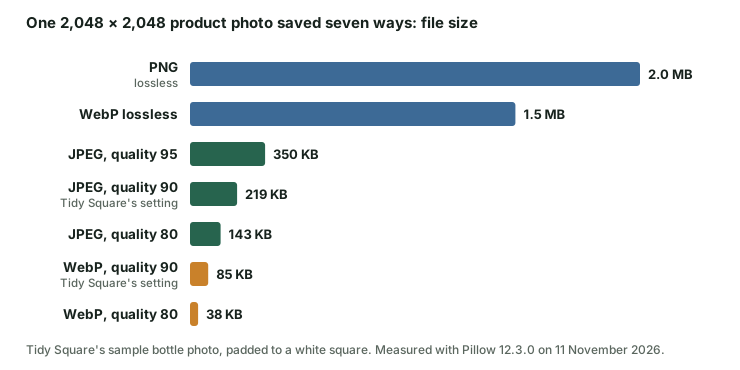
- JPEG is the safe choice for photos. Every marketplace, store, email program and print lab reads it. In that test the quality-90 JPEG was 219 KB against 2.0 MB for the PNG, about a tenth of the size.
- WebP was smaller again: 85 KB at quality 90. Use it for your own website. Check before using it elsewhere, because not every marketplace or lab takes it.
- PNG keeps every pixel exactly, and keeps transparency. That makes it right for logos, size charts and cut-outs, and wrong for photos. In the same test a flat-colour size chart was 29 KB as a PNG and 69 KB as a quality-90 JPEG, so for graphics PNG wins on size as well as on sharpness.
Pixel size matters more than the quality slider. Halving the width and height of that test photo cut the JPEG from 219 KB to 58 KB, far more than dropping the quality from 90 to 80 did. If a file is too big, make it smaller in pixels before you make it uglier.
For what each selling site asks for, see Product image sizes for Etsy, Shopify, Amazon and eBay. Etsy, for one, warns that files over 1 MB may not finish uploading on a slow connection, which is what the "1 MB" target is for.
When not to use this tool
- You only want the location and camera details gone. Use Photo Privacy Check instead. It removes the metadata from a JPEG and leaves the picture data untouched, byte for byte. This tool re-encodes the picture, which you don't need. The guide How to remove photo metadata without losing quality explains the difference.
- The file is already a JPEG of a sensible size. Saving a JPEG as a JPEG again costs a little detail every time, and at a high quality setting the new file can come out larger than the old one. Convert from your original, once.
- You need the images square. Square Images pads photos to matching squares and exports them in one step. The guide Make product photos square and consistent covers why.
- You are sending a photo to a print lab. Labs want all the pixels you have. Don't shrink a photo before printing it.
Limits and honest notes
- Every file is re-encoded. JPEG to JPEG and WebP to WebP are one more lossy save on top of the ones the image has already had. Our test of re-saving one photo 20 times shows how that adds up, especially when the settings change between saves.
- Metadata is not carried over. The new files are built from pixels alone, so EXIF details such as GPS location, date and camera are not in them. Neither is a copyright note or a wide colour profile, and colours are saved as standard sRGB.
- PNG output of a photo is usually larger, not smaller. PNG has no quality setting to turn down. The table will show "larger" in red when that happens. It is not a fault.
- Transparent areas turn white in a JPEG. JPEG can't store transparency, so the tool fills see-through pixels with white, the same rule as Square Images. PNG and WebP keep them.
- Target size works for JPEG and WebP only, and only between quality 40 and 95. Below 40 the damage is easy to see, so the tool stops there and tells you.
- The quality number is your browser's, not a universal scale. Each browser has its own JPEG and WebP encoder. Quality 90 in Chrome and quality 90 in Safari or Photoshop give different file sizes. The sizes on this page were made in Chrome.
- WebP needs a browser that can save it. The tool tests this when the page loads and switches the option off if your browser can't.
- Up to 20 images, 20 MB and 25 megapixels each. JPEG, PNG and WebP in. Animated images and HEIC photos are not supported. The ZIP is limited to 160 MB.
- Resizing only goes down. An image smaller than the size you pick is left alone.
Questions
Are my images uploaded?
No. They are opened, converted and saved by your own browser on your own device. The page has nowhere to send them. Closing or refreshing the page clears the list.
What quality should I use?
For product photos and anything people will zoom into, 85 to 90. For a small picture in an email or a blog post, 75 to 80 is usually fine. Above 95 the files grow quickly for little visible gain. If you have a size limit to meet, use the target instead and let the tool find the number.
Why did my file get bigger?
Usually for one of two reasons. You saved a photo as PNG, which stores every pixel exactly. Or you saved a JPEG that was already well compressed at a higher quality than it had before, which can't put detail back but does spend more bytes describing what is there.
The tool says it can't reach my target. What now?
Choose a smaller "longest side" and convert again. Fewer pixels is the kindest way to make a file smaller. If the image has to stay at its full pixel size, pick a bigger target, or try WebP if the place you're sending it accepts it.
Does converting a PNG to a JPEG lose quality?
A little, once. JPEG throws away fine detail the eye is unlikely to miss. At quality 90 the difference from the original is very hard to see in a photo. It is easier to see in graphics with sharp edges and text, which is why those are better left as PNG.
Can I convert HEIC photos from an iPhone?
Not here. Browsers can't open HEIC files themselves, and adding a decoder would mean a much heavier page. Your phone can export a JPEG instead: the guide on printing phone photos shows how.
Related guides
- JPEG, PNG or WebP for product photos? One photo saved seven ways, with every file size, and a format picker.
- Product image sizes for Etsy, Shopify, Amazon and eBay Minimum and recommended pixels, shapes and file limits side by side.
- Make product photos square and consistent Pad instead of cropping, and keep one pixel size across a shop.
- How to remove photo metadata without losing quality What re-saving costs, and how to avoid it when you only need the metadata gone.
Independent tool by Tidy (Infinite Dev Works). Platform limits change, so check the current rules where you are uploading.